Yes, FlixFox works on your TV. The FlixFox TV app (v2.1.3, 21 MB) runs on Android TV, Google TV and Amazon Fire TV Stick, with a layout you can control entirely with your remote. New TV users get 5 days of FlixFox Premium free, so you can try movies, web series, live TV and cricket on the big screen with no ads. Install it once with the free Downloader app or a USB drive, and you're ready to go.
Download FlixFox TV APK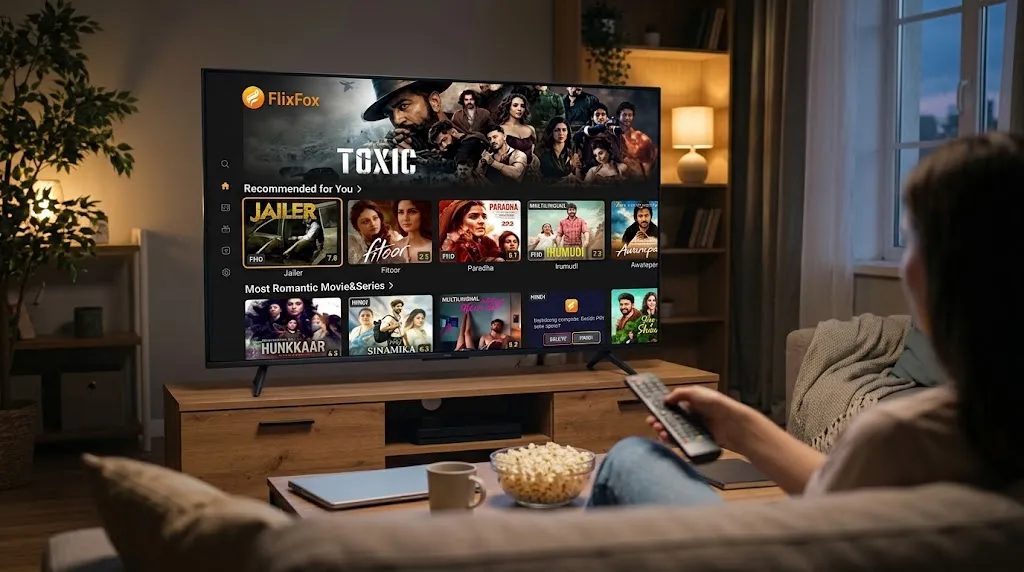
FlixFox for TV is the version of FlixFox built for television screens. The library is the same one you know from the phone app: more than 1 lakh movies and shows, regional content in Hindi, Tamil and Telugu, live TV channels and a sports section. The difference is the layout. Rows, buttons and menus are sized for a living-room screen and arranged so you can move around with the arrow keys and OK button on your remote.
Like the mobile app, FlixFox for TV isn't on the Google Play Store or Amazon Appstore. You install the APK directly, a process called sideloading. It sounds technical, but on most TVs it takes about ten minutes the first time and only a minute or two for future updates.
Watching on TV is part of FlixFox Premium. New TV users get 5 days of Premium free to start. After that, you'll need a Premium plan to keep watching on your TV. If you already have Premium on your phone, you don't pay again: one Premium account works on up to 3 phones and 2 TVs.
If you only want FlixFox on your phone, the phone install guide on our home page covers that.
| App Name | FlixFox for TV |
| Version | v2.1.3 |
| Last Updated | September 30, 2026 |
| APK Size | 21 MB |
| Works On | Android TV, Google TV, Fire TV Stick and Fire TV devices |
| Android Required | 6.0 and above (Android TV OS or Fire OS) |
| TV Access | 5 days of Premium free for new users, then Premium |
| Max Quality | Full HD 1080p |
| Languages | English, Hindi, Tamil, Telugu |
| Ads | None (Premium) |
| Account | Needed for Premium |
| Price | Free 5-day trial, then Premium plan |
Move through rows and menus with the arrow keys, and press OK to play.
Pick up to 1080p for a sharp picture on your living-room screen.
Live channels and a sports section, ready for match nights with family.
Set Hindi, Tamil, Telugu or English as your preferred content languages.
New TV users get 5 days of Premium free, with no payment needed.
Your Premium account covers up to 3 phones and 2 TVs.
These systems can't install APK files, so FlixFox can't run on them. If your TV uses one of these systems, a Fire TV Stick or Google TV device plugged into an HDMI port will give you FlixFox on the same screen.
Not sure what your TV runs? Open Settings and look for About or Device Preferences. If you see Android TV OS, Google TV or Fire OS, you're good to go.
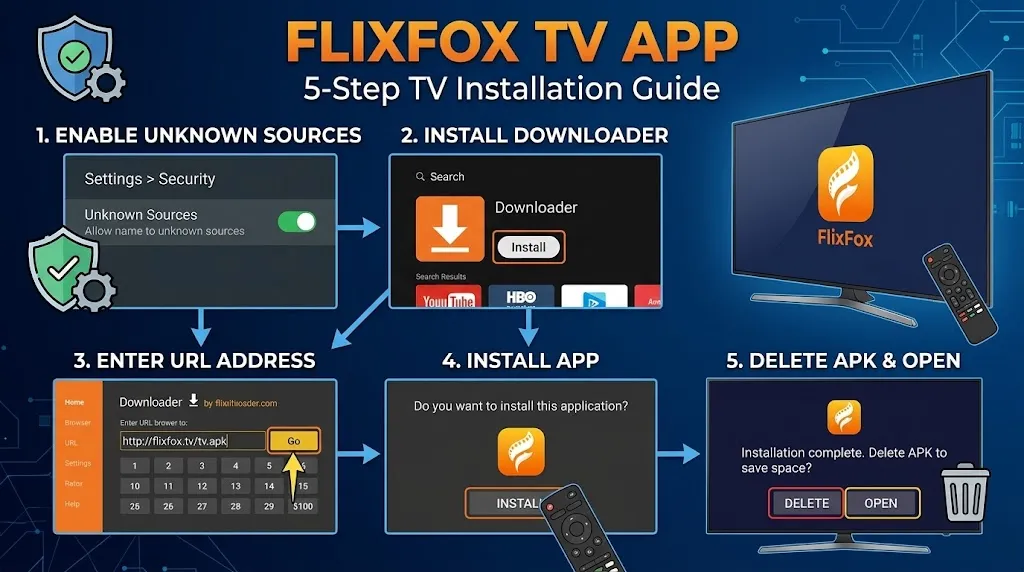
There are two ways to get FlixFox onto your TV. Method 01 uses the free Downloader app and works for most people. Method 02 uses a USB drive and is handy if your TV's internet is slow or Downloader won't install.
TVs block apps from outside their official stores by default. Open the tab for your device and follow the steps.
Applies to Chromecast with Google TV and Google TV models from Sony, TCL and other brands.
Applies to Mi Box, Mi TV Stick and other Android TV devices.
Menu names can vary slightly between TV brands and software versions. If you can't find a setting, look under Security, Apps or Device Preferences.
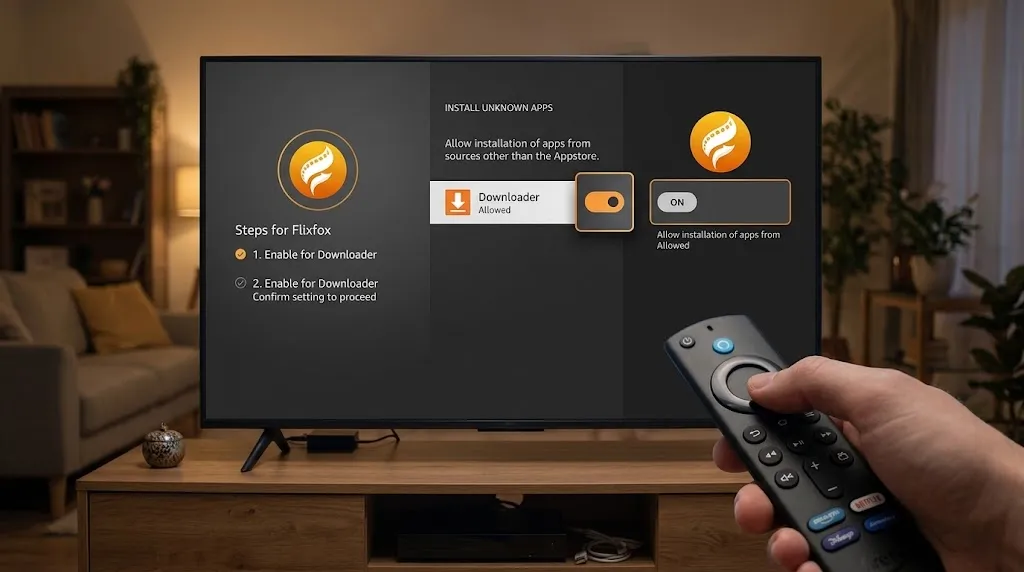
Open the app store on your TV: Amazon Appstore on Fire TV, or Google Play on Android TV and Google TV. Search for Downloader by AFTVnews and install it. It's free. Then go back to Step 1 and switch on unknown sources for Downloader.
Open Downloader. In the URL box, paste the official FlixFox TV download link from the download button on this page. If the official site publishes a short Downloader code, you can enter that instead. Select Go. The FlixFox TV APK starts downloading.
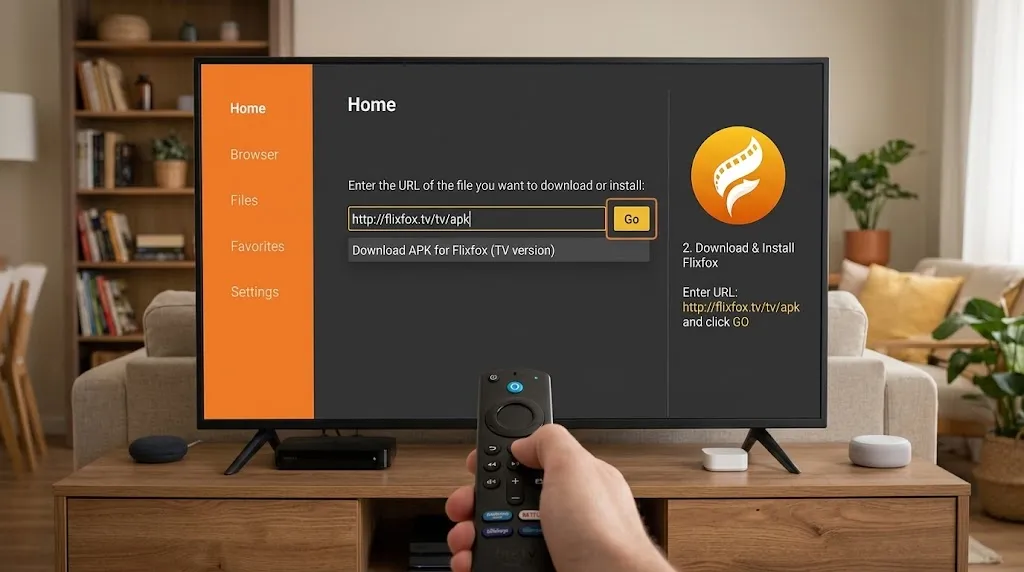
When the download finishes, an install screen appears. Select Install. After a few seconds you'll see App installed.
Downloader will ask whether to delete the APK file. Select Delete, then confirm. The app stays installed, and you free up storage, which matters a lot on a Fire TV Stick. Now select Open, or find FlixFox in your apps list.
This method suits TVs with slow internet, or devices where Downloader isn't available. Fire TV Sticks don't have a USB port, so use Method 01 for those.
When a new version is released, FlixFox shows an update prompt inside the app. Select Update and follow the steps. You can also repeat Method 01: open Downloader, enter the same address, and install the new APK over the old one. Your preferences and downloads normally stay in place.
Unknown sources isn't enabled for the app you're installing from. Go back to Step 1 and switch it on for Downloader or your file manager specifically.
Check the spelling of the URL or code, and make sure your TV is online. Open any other app that uses the internet to confirm the connection works.
The download didn't finish properly. Delete the file in Downloader, download it again, and make sure your device runs Android 6.0 or above.
On Fire TV, open Settings > Applications > Manage Installed Applications, or hold the Home button and open Apps. Then move FlixFox to the front, as described above.
Make sure you're signed in on the TV with the same account you used to buy Premium. Each Premium account supports up to 2 TVs, so sign out on an old TV if you've reached the limit.
Lower the quality to 720p, move your Wi-Fi router closer to the TV, or use a wired connection if your TV box has an Ethernet port. Restarting the TV and router often helps as well.
Fire TV Sticks run out of space quickly. Delete APK files left in Downloader, uninstall apps you don't use, and clear the cache of large apps under Settings > Applications.
Yes. FlixFox installs on Fire TV Stick, Fire TV Stick 4K and Fire TV Cube using the Downloader app.
No. Samsung (Tizen) and LG (webOS) TVs can't install APK files, so FlixFox isn't supported on them. Android TV, Google TV and Fire TV devices are supported.
New TV users get 5 days of Premium free. After that, watching on TV needs a FlixFox Premium plan.
Yes. Sign in to start your free trial or to use your Premium account.
You'll need Premium to keep watching on TV. Subscribe from Me > Subscribe or activate a Premium code.
Yes. Sign in with the same account. One Premium account works on up to 3 phones and 2 TVs.
FlixFox is distributed as an APK from its official website, so you install it with Downloader or a USB drive instead of a store.
FlixFox includes live TV channels and a sports section with cricket. Which matches are available depends on what's being broadcast.
Accept the in-app update prompt, or open Downloader, enter the same address and install the new APK over the old one.
It has the same library and features, with a layout designed for big screens and remote control.